Posted: Sun Jan 01, 2006 11:39 am
Ho scaricato ed installato il programma, ma non lo lancia... Safari non può collegarsi al server 127.0.0.1  ??:
??:
??:Mac Peer Forum. Forum dedicato al Mac e alle sue applicazioni. Ipad, iPhone e iPod
https://www.tuttologia.com/mac-forum/
??:Premetto: non conosco il programma e non l'ho installato.doc54 wrote:Ho scaricato ed installato il programma, ma non lo lancia... Safari non può collegarsi al server 127.0.0.1
After you reboot from the Life Record installation, there is one final task to complete
before you can start using Life Record.
Open up System Preferences, and select Sharing.
You will be presented with a list of services that are
enabled on your system.
The third checkbox down is web sharing. Make sure that
it is selected and running. If it’s not, enable web sharing
by clicking the check box. Close System Preferences
when you are done.
Congratulations! Your Life Record EMR is now set up
and ready for you to configure!
You can access Life Record by opening up your web
browser and going to the address http://127.0.0.1/xsys/.
Please read the Life Record User Manual for details and
information on setting up your new EMR.
For support, please feel free to log on to our support site
at http://www.liferecord.com/support/.

Non c'è bisogno di assistenza.doc54 wrote:Se guardi i costi di assistenza - vedi ultimo tuo link - abbandoni l'idea...
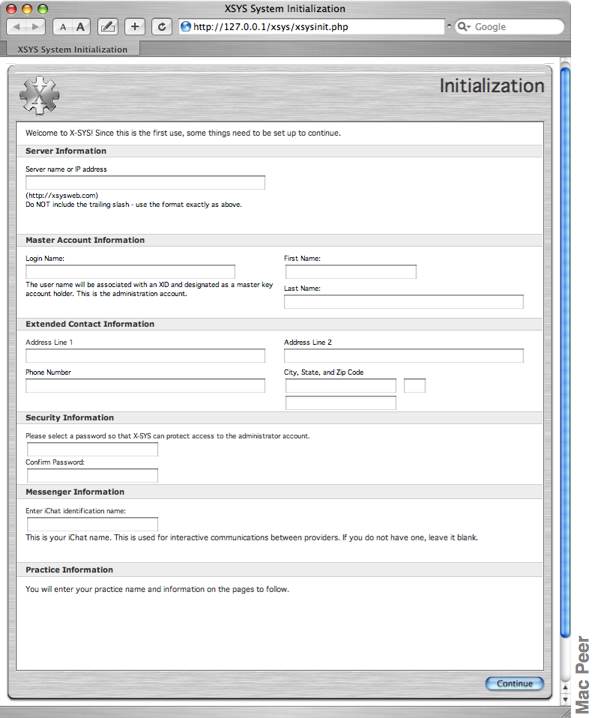
Nel primo campo devi inserire il tuo IP preceduto da http://doc54 wrote:Procedura eseguita... inserendo ID e password, risponde: URL not found :evil:
Non lo so, francamentedoc54 wrote:Eh già... purtroppo ho sbagliato a compilare campo relativo all'IP.
Ho rprovato a riaprire il link della pagina Initialization, ma mi porta direttamente alla schermata con ID e password, che naturalmente non mi accetta. Come posso rifare la procedura dall'inizio? Grazie.

