Page 2 of 4
Posted: Mon Jun 19, 2006 10:04 am
by avrobay
Aggiornamento: REELBEAN 1.1

Added extra video and audio conversion types to the export drawer, and improved the appearance of the drawer.
Added a button in the export drawer for saving the current video frame in an image file.
Corrected a bug with the sizing of the movie window which previously caused the time field to overlap the player controls for very small width movies.
http://js8media.com/reelbean/
Posted: Mon Aug 07, 2006 9:14 am
by avrobay
Aggiornamento interessante segnalatomi da Flashcream (7 Agosto):
Version 1.2:
Minor bug fix with menu item naming.
If you have Windows Media components installed, ReelBean can now convert from WMV files.
Extends the availability period of the full-featured free version.
http://js8media.com/reelbean/
Posted: Tue Aug 29, 2006 11:14 am
by avrobay
Posted: Tue Sep 12, 2006 2:13 am
by avrobay
REELBEAN 2.0
http://www.js8media.com/reelbean/
Nota importante: Con la nuova versione
Non tutte le funzioni di ReelBean sono gratuite, ma la maggior parte sì:
Most features in ReelBean are free, including playing video and audio in over 50 differents formats, playing DVDs, streaming videos, saving video frames as images, editing videos, adding audio tracks to videos, changing the playback speed, displaying video info panels and displaying/adding video annotations.
New free features include preferences to auto start movies on opening and start movies from the last point played when re-opening.
Pro features include exporting videos in many formats as listed in the user guide, scene selection drawer, extraction of video/audio tracks to new files, an adjustable video transparency controller and audio recording.
New icons to make GUI features clearer.
Improved GUI design of the track extraction panel, including being able to set the start and end extraction times directly from the position of the playhead.
Various bug fixes.
NUOVA ICONA:

Posted: Sun Mar 04, 2007 7:41 pm
by lapis
non mi e' chiaro per nulla come si effettua il taglio di un video
qualcuno me lo puo' spiegare?
grazie

:
Posted: Sun Mar 04, 2007 9:50 pm
by avrobay
lapis wrote:non mi e' chiaro per nulla come si effettua il taglio di un video
qualcuno me lo puo' spiegare?
grazie
:
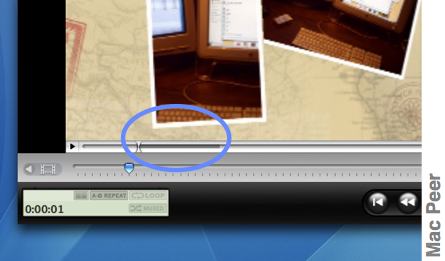
Edit > Show Edit controller
Poi trascina il cursore tenendo premuto il tasto maiuscole per selezionare una porzione di filmato.
Fammi sapere.
Posted: Sun Mar 04, 2007 11:53 pm
by lapis
colpito e affondato.

grazie mille
Posted: Sun Mar 11, 2007 4:04 am
by hellare
Mi sembra di capire che la nuova versione non lasci "freely" tagliare parti di video o salvare audio. Sapete se la precedente versione free è scaricabile da qualche parte?
Posted: Sun Mar 11, 2007 4:39 am
by avrobay
hellare wrote:Mi sembra di capire che la nuova versione non lasci "freely" tagliare parti di video o salvare audio.
Salvare l'audio è una funzione disponibile anche senza acquistare la licenza. Ma è solo per MAC PPC:
"Extracting audio from movies directly into iTunes
(Note: this feature is not yet implemented for the Intel version of ReelBean.) The Extract Movie Tracks option in the Window menu will display a window listing the media tracks inside the movie. At the bottom of the window displayed there is a button marked "Extract Audio to iTunes." Clicking this will cause the audio to be extracted from the movie into an AIFF file on your desktop. A dialog window is then displayed to allow immediate import of the file into your iTunes library, using either MP3, WAV or AAC compression. Audio cannot be extracted from an MPEG1 Muxed movie."
Ti ricordo che comunque Mpeg StreamClip è gratuito e fa tutte queste belle cose
 http://www.squared5.com/svideo/mpeg-streamclip-mac.html
Posted: Sun Mar 18, 2007 12:46 am
by lapis
Reelbean e' un ottimo programma
Mi si verifica pero' questo inconveniente
quando esporto fa solo il video e non anche l'audio e non mi da' la possibilita' di settare niente
cosa devo fare?

