Page 1 of 3

msn@ + account di posta AIM (RISOLTO)

Posted: Thu Aug 11, 2005 7:43 am
by macDavid
ragazzi forse e' una domanda stupida, ma io non lo so: non e' piu' possibile registrarsi per avere una mail con @msn.com???? c'e' solo hotmail.....grazie.

Posted: Thu Aug 11, 2005 7:52 am
by peciot
non credo, perchè msn è hotmail... :)

ma non ne sono certo! :? ??:

Posted: Thu Aug 11, 2005 8:02 am
by macDavid
ho attivato un accaunt aol(gia' ricevuta la mail di conferma): come faccio a leggere le mail??domanda stupida lo so, pero dopo il login di aol: non vedo nessuna voce!!! si legge solo con Mail?? thanks
msn non esiste piu' come dominio credo ce solo @hotmail...

Posted: Thu Aug 11, 2005 8:07 am
by avrobay
macDavid wrote:ho attivato un accaunt aol(gia' ricevuta la mail di conferma): come faccio a leggere le mail??domanda stupida lo so, pero dopo il login di aol: non vedo nessuna voce!!! si legge solo con Mail?? thanks
msn non esiste piu' come dominio credo ce solo @hotmail...
Credo di non aver capito la domanda :?
L'account AOL lo hai attivato per iChat, no?
Forse vuoi utilizzare quell'account anche per la posta?

Posted: Thu Aug 11, 2005 8:24 am
by macDavid
per leggere delle semplicissime mail:con Ichat entro tranquillamente..voglio mandare una mai dal nuovo accaunt e vedere le mail che mi mandano ,verso l'accaunt aol: uso per forza Mail??

Posted: Thu Aug 11, 2005 8:29 am
by macDavid
come configuro mail per usarlo con un accaunt aol? server di entrata? ecc...thanks
Posted: Thu Aug 11, 2005 8:39 am
by avrobay
macDavid wrote:per leggere delle semplicissime mail:con Ichat entro tranquillamente..voglio mandare una mai dal nuovo accaunt e vedere le mail che mi mandano ,verso l'accaunt aol: uso per forza Mail??
Premetto che non ho mai usato il mio account AOL per la posta. Sono andato a vedere come si fa.
Clicca qui:
http://r02.webmail.aol.com/options/auth ... tions.aspx
ti dovrebbe fare un redirect alla pagina di entrata. Metti la tua password e accedi alla posta.

Fammi sapere

Posted: Thu Aug 11, 2005 8:44 am
by avrobay
macDavid wrote:come configuro mail per usarlo con un accaunt aol? server di entrata? ecc...thanks
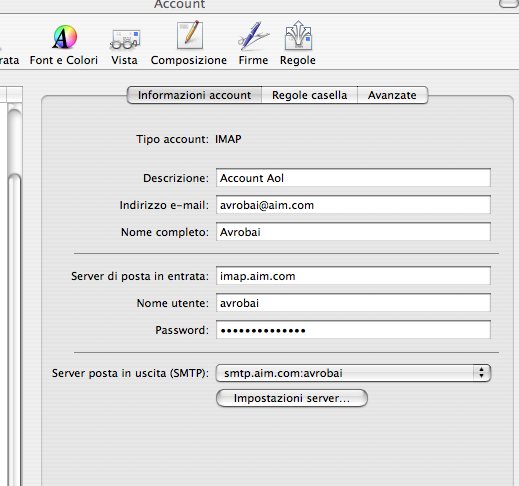
Setting up Apple® Mail version 2.0
The AIM Mail servers allow you to send and receive email using most common email programs. Setting up Mail (Apple OS® X Mail) is quick and easy. If this is the first time you have launched Mail, follow the steps below. If you have other accounts already set up in Mail and you want to add your AIM Mail account, start the Mail program and begin with step 2 below.
Set up Apple Mail:
Start Mail 2.0 and from the File menu, select Add Account....
In the Account Type drop-down menu, select IMAP.
In the Account Description field, enter a description for the mailbox. (for example, GabbyGrace or AIM Mail).
In the Full Name field, enter your name as you would like it to appear on your outgoing email (for example, Gabby Grace).
In the Email Address field, enter your AIM email address (for example, GabbyGrace@aim.com). Click the Continue button.
In the Incoming Mail Server field, enter: imap.aim.com.
In the User Name field, enter your AIM screen name (for example, GabbyGrace).
In the Password field, enter the password for your AIM account. Click the Continue button.
In the Outgoing Mail Server field, enter: smtp.aim.com.
Place a check mark in the box next to Use Authentication and enter in your AIM screen name and password. Click the Continue button.
Verify the accuracy of all the information that you entered and click the Continue button to go to the next page.
Click the Done button to finish. Then click the Get Mail button to retrieve any emails.

Fammi sapere se ci sono problemi

Posted: Thu Aug 11, 2005 8:52 am
by avrobay
Con questa immagine dovrebbe essere tutto più chiaro:
Image

Posted: Thu Aug 11, 2005 8:53 am
by macDavid
ho capito...avro 3 indirizzi mail allora...uno per msn, uno per aol, uno per ricevere le amil (quello di msn no perche e' una lunga storia) vabbe ci faro' l'abituduine cmq grazie mille