Page 1 of 2

Creare iso

Posted: Wed May 24, 2006 8:45 pm
by Mad
ciao a tutti....
dovrei creare un file .iso partendo da un cd ma non ho toast..... come posso fare?

:D

Posted: Wed May 24, 2006 8:50 pm
by avrobay
Con questa applicazione gratuita converti i dmg in ISO:
http://www.zerolives.org/apps/

Damage Isolation is a little app to ease the process of converting apple's Disk Image (.DMG) files to a more world-readable .ISO file, for sharing amongst windows, linux, and versions of MacOS prior to OS X. It also adds a few little features to make things ever easier.

2. Usage
---------------

Using Damage Isolation is easy. Just open the application, and drop a file onto it's icon in the dock. It doesn't require any configuration, but you can alter any of the settings you wish by clicking the Preferences button in the main window.

3. Options
---------------

The following options are located in the Preferences window of Damage Isolation:

* Compress .ISO with gZip

This option will toggle weather or not Damage Isolation compresses your image after it is converted, using the gZip compressor.

* Quit When Finished

Checking this box will make Damage Isolation quit automatically after the successful conversion of an image.

* Compression Quality

This pulldown menu sets the compression level of gZip. It is not used if Compress .ISO with gZip is unchecked. A higher number will compress files better, but require more time to complete.

* Verbose Mode

This option, when turned on, will display information as Damage Isolation works with your image, such as, it's size.

Posted: Wed May 24, 2006 8:54 pm
by Mac 4 Life
Questa applicazione converte i .dmg in .iso.

;)

EDIT: risposta un po' tardiva... :)

:smt039

Posted: Wed May 24, 2006 8:55 pm
by Mad
Grazie ragazzi :D

ora lo provo subito :D

come al solito siete super efficienti ;)

Posted: Fri Jun 02, 2006 8:43 am
by avrobay
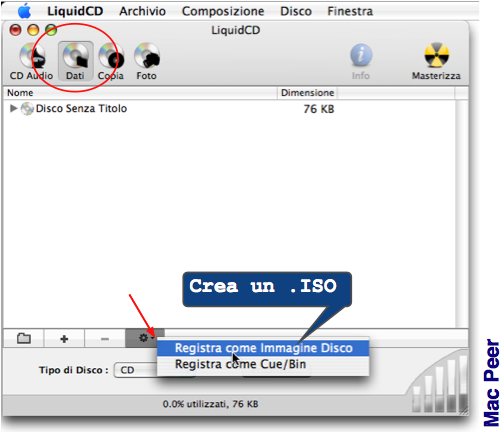
Segnalo che l'ottimo LiquidCD (freeware) permette di creare immagini disco .iso con un solo click

http://www.maconnect.ch/index.php?page=liquidcd&lang=en

Image

iso

Posted: Wed Mar 10, 2010 11:46 pm
by ruvolettostefano
come faccio a creare una cartella iso o altroo x masterizzare i file che scarico con jdowndoader...

cioe' bisogna cambiare le impostazioni di jdownloader??

Posted: Wed Mar 10, 2010 11:48 pm
by ruvolettostefano
cioe' bisogna cambiare le impostazioni di jdownloader??

Posted: Thu Mar 11, 2010 12:48 am
by Votantonio
Non è molto chiara la tua richiesta comunque dai una lettura a queste pagine:
http://www.tuttologia.com/basic/CD-DVD-Finder.html
http://www.tuttologia.com/macp2p/showthread.php?t=21526.
http://www.tuttologia.com/macp2p/showthread.php?t=19309
http://www.tuttologia.com/macp2p/showthread.php?t=29795
http://www.tuttologia.com/freeware/burn.html.

Aggiungo anche che JDownloader potrebbe crearti dei seri problemi prima o poi quindi ti suggerirei di disinstallarlo.

Posted: Thu Mar 11, 2010 1:00 am
by ruvolettostefano
in poche parole ho scaricato un film con jdowndoader pero' non mi ha creato la cartella iso dove posso copiare i file direttamente nel dvd premendogli sopra....ma mi ha solamente creato le singole cartelle di ogni link cioe' i singoli part 01 rar...part 02 rar ecc ecc...come posso fare x copiare e vedere il film??

Posted: Thu Mar 11, 2010 1:03 am
by rob
Ciao ruvlettostefano,
benvenuto su Mac Peer. :)

Se non l'hai già fatto, ti suggerisco di leggere le regole di Mac Peer.
Una di questa è quella di utilizzare la ricerca, poiché molte domande sono già state poste.
Inoltre poni domande più precise e dettagliate.

Grazie e buon forum.